Work over here.
Life over there.
Give your work and personal accounts separate spaces. Open the account you need without signing out of the other.
 MultiX.
APP CLONING, MADE SIMPLE
Your work. Your people. Your next level.
Keep different accounts in their own app spaces, all on one Android phone.
Android 8.0+ · Free to start · Contains ads & in-app purchases
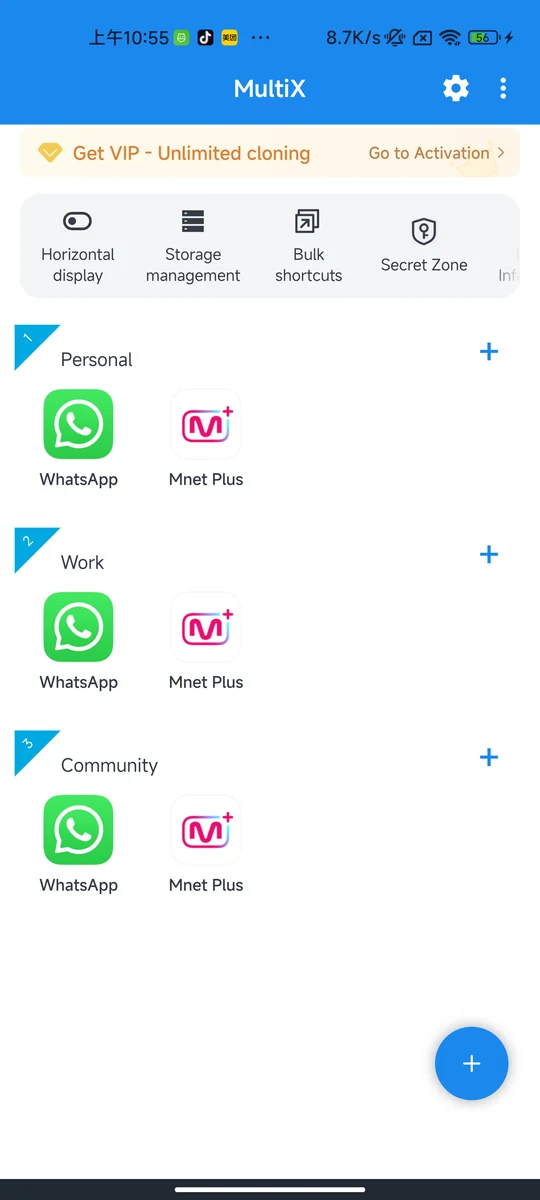
English interface shown; sample account data
A LITTLE MORE ROOM
You don’t need another phone to give your accounts a place of their own.
Give your work and personal accounts separate spaces. Open the account you need without signing out of the other.
Manage a personal profile and a community account in separate app spaces, where the service allows it.
Keep different game profiles organized. App compatibility and account rules depend on the game you play.
One clone per app is free. Additional copies and batch creation require VIP. Compatibility varies by device and app.
Open MultiX, tap + and choose an app already installed on your phone.
Create your clone in a separate space. Give it a name you’ll recognize.
Tap the clone and sign in with your other account. Long-press its icon for management options.
A GOOD PLACE TO START
Yes. The free version lets you create one clone of each app and contains ads. More copies, batch cloning and other member features require VIP. Check the membership screen in the app for current prices and terms.
A clone uses a separate app space. Sign in to it yourself with the account you want to use. Creating a clone does not automatically copy your original account login or chat history.
Compatibility depends on your phone, Android version and the app being cloned. Some apps restrict use in virtual environments. Try the free clone before purchasing membership.
No. A separate app space does not grant additional voting rights or change another service’s rules. Account eligibility, device checks and voting limits are controlled by that service.
MAKE A LITTLE SPACE
Start with one free clone per supported app.